messages.products.premium_problem_label
Break-fix reliance on generic IT providers means scanners, printers and mobile terminals wait 3–7 days for repair, freezing warehouse or production throughput. Out-of-warranty devices accumulate in storage as dead capital.
messages.products.premium_audience_label
IT Infrastructure Managers and Operations Directors running fleets of 50+ scanners, printers and Android terminals who need guaranteed SLA repair.
messages.products.premium_implementation_label
messages.products.gallery_eyebrow
messages.products.gallery_title



Compatibility to assess
Systems and equipment for integration
This list presents systems and equipment for assessing an integration. Available capabilities, compatible versions and workflows must be confirmed for each project; a logo is not evidence of an installed connector or a validated workflow.
ERP
messages.products.no_system_found
messages.products.why_rosistem
messages.products.why_rosistem_headline
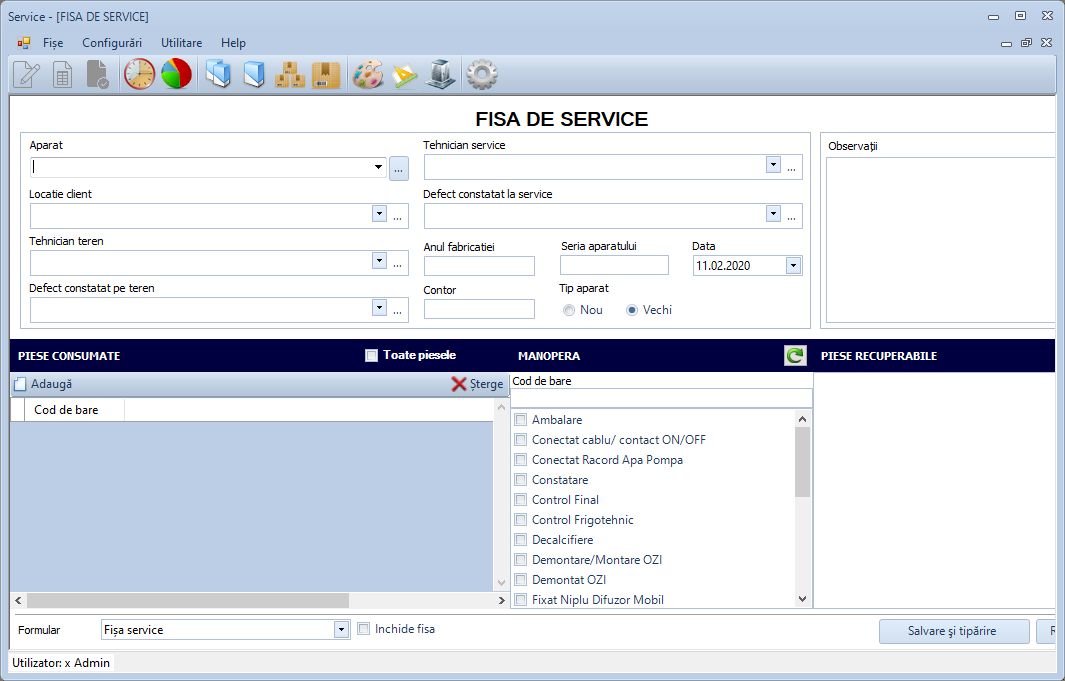
Complete Service Flow, from Call to Invoice
Step 1: Call registration and service ticket creation
The customer calls or sends an email. The operator creates the ticket in the system: customer, equipment (from the managed equipment database), symptom, priority, and SLA. The customer automatically receives confirmation with the ticket number.
Step 2: Technician allocation and intervention scheduling
The service manager allocates the available technician and sets the intervention date. The technician receives a mobile notification with work order details: address, equipment, history of previous interventions.
Step 3: Field intervention with mobile app
The technician uses the mobile app for: GPS check-in at customer, equipment scan (barcode/QR/serial number), recording work performed, parts consumption from own stock, digital customer signature.
Step 4: Ticket closure and automatic billing
Upon ticket closure, the system automatically generates the consumption note for used parts and the customer invoice. Spare parts stock is automatically updated.
Frequently asked questions
Can I manage equipment at multiple customers with the same system?
Yes. Each equipment is associated with a customer and a location. You can see, for any customer, all equipment, intervention history, active warranties, and consumed parts.
How do I track equipment warranties?
Each equipment has a purchase date, warranty period, and automatically calculated expiry date. The system alerts before expiry and automatically marks interventions as "under warranty" or "post-warranty".
Does the technician app work without internet?
Yes. The mobile app has full offline mode. The technician can work in locations without signal, and data synchronizes when the connection is restored.
Does it integrate with existing invoicing systems?
Yes. We have integration with Oblio.eu, SmartBill, and ERP systems via API. Invoices generated in service can be sent directly to accounting without re-entry.
Ready to implement Rosistem Service?
Request a free, personalized demo for your company. Our consultant will contact you within 24 hours.
Other Rosistem solutions